 NEXT GUEST
One QR on the fridge. The answer before they text you.
Your guests open it on their phone and see your house, plus everything happening outside it today. It updates itself every day, for every guest, without you.
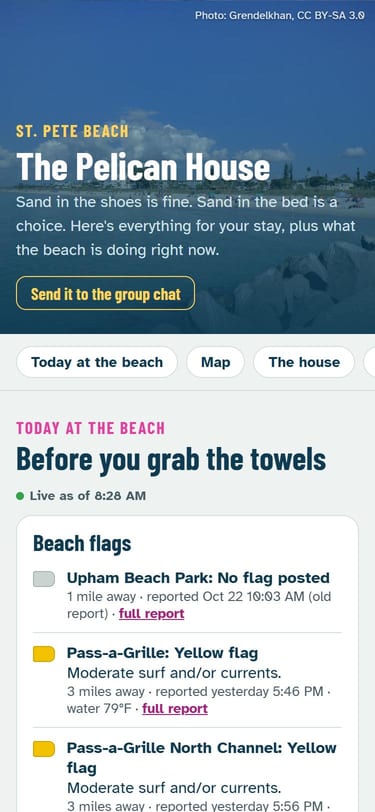 Your photo, your hello
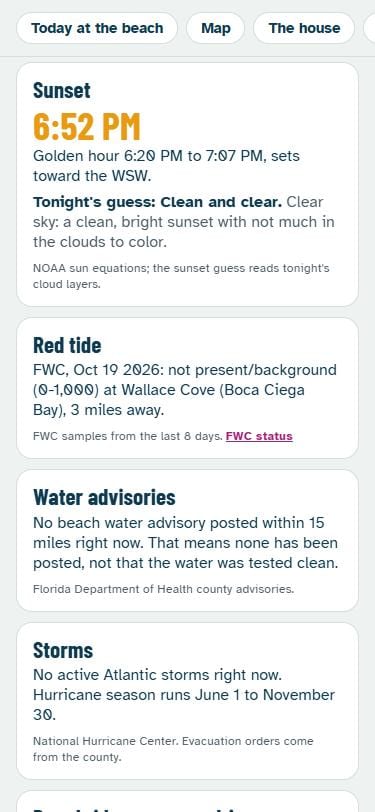 Today outside, live
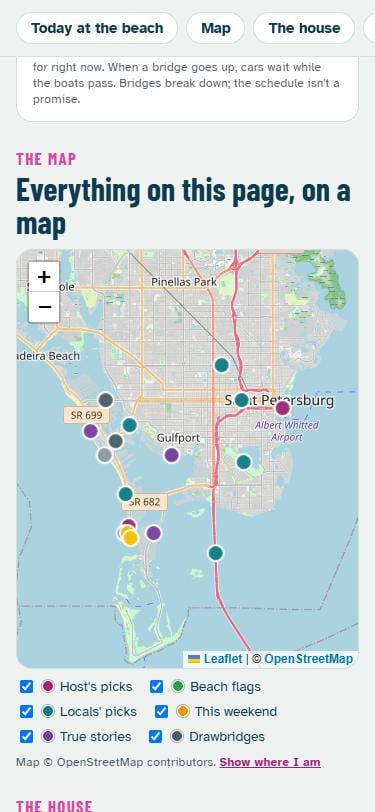 Everything on one map
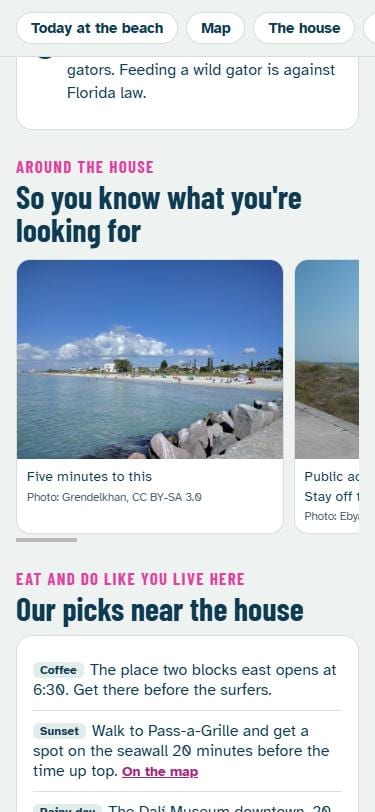 Rules and photos
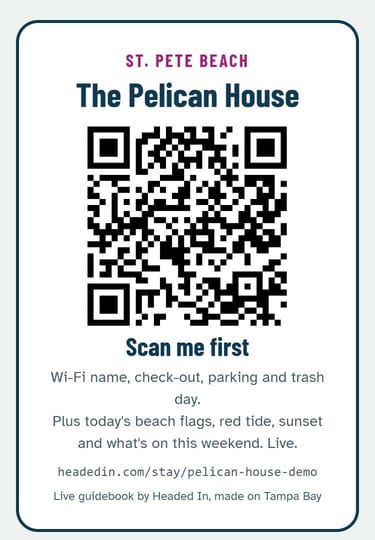 The fridge card
Real screens from our sample house. Swipe for more, tap one to open it live.
No app for your guests. No account for you. Any house in the US.
Every guest, before and after
Before
- Make a new code
- Text it, then text it again
- Send the Wi-Fi password
- Answer "is it going to rain?"
- Text the cleaner the dates
- Delete the old code
With Next Guest
- Code made and sent
- Sent again 2 days before
- Wi-Fi rides along
- The guidebook answers it
- It's on their calendar
- It stops by itself
Tap what you want to see
What your guest gets, start to finish
- 1THEY BOOK
Their own door code comes with the booking confirmation. No waiting for you to text it.
- 22 DAYS BEFORE
The code again, with the Wi-Fi details, your check-in message and the link to your live guidebook: the forecast, sunset and what's on in town (at a Florida beach house, today's beach flags too).
- 3AT THE DOOR
They type their code and walk in. No lockbox, no key under the mat, no 11 PM call to you.
- 4INSIDE
One scan of the fridge QR opens the guidebook, and the Wi-Fi card gets every phone online.
- 5CHECKOUT
A short checkout list with no chores, a Book again button, and their code stops working by itself.
What runs itself after one setup
A new code every booking
Airbnb makes it and sends it to the guest. You never open the lock app.
Codes that stop by themselves
Each code works from check-in and quits after checkout, so last week's guest can't come back.
A guidebook that updates itself
One QR on the fridge. The weather, alerts, sunset and local events change every day without you.
Wi-Fi you never reset
Guests get their own network, so the password can stay the same for years.
Your messages, sent for you
Airbnb's scheduled quick replies send your welcome and check-in notes for every booking, a day before check-in or whenever you pick.
Your cleaner sees every checkout
Airbnb's calendar export link goes in their phone's calendar, and new bookings show up there on their own.
Stop changing the door code after every guest
The door
A Wi-Fi smart lock linked to your Airbnb listing. Airbnb makes a new code for each booking and sends it to the guest with the booking confirmation, then again 48 hours before arrival. The code works from check-in time and stops 30 minutes after checkout (you can pick 15 minutes to 2 hours).
What it costs
Step 1: Pick a lock for your weather
The keypad sits outside all winter, so the cold rating matters. Every lock here has Wi-Fi built in (no hub), a free app, and is on Airbnb's list for a direct link. Where's the house?
All five locks side by side
| Lock | Price seen Nov 11 2026 | Outside rating | Batteries |
|---|---|---|---|
| Schlage Encode Smart WiFi Deadbolt | $299 | -31°F to 150.8°F | 4 AA, up to about 6 months |
| Schlage Encode Plus (adds Apple Home Key) | $329 | -31°F to 150.8°F | 4 AA, up to about 6 months |
| Yale Assure Lock 2 Keypad with Wi-Fi | $259.99 | -22°F to 140°F | 4 AA; about 3 months on Wi-Fi in one review |
| Yale Assure Lock 2 Touch with Wi-Fi (fingerprint too) | $279.99 | -22°F to 140°F | 4 AA |
| August Wi-Fi Smart Lock + Yale Keypad (fits inside, on your deadbolt) | $229.99 bundle; lock alone was on sale at $99.99 | Keypad is weather-sealed (IPX5); no temperature published | Lock: 2 CR123, about 3 months. Keypad: about 7 months |
Ratings and prices from each maker's own product page, seen Nov 11 2026. Prices change; check before you buy. Airbnb's full list of locks it links to: airbnb.com/help/article/3478.
Before you buy: check the lock fits your door (the maker's page lists door thickness and the hole size), and that your Wi-Fi reaches the front door on 2.4 GHz. Stand at the door with your phone on Wi-Fi: if a video plays, you're fine.
Step 2: Link it to Airbnb
Works for listings in the US and Canada, one lock per listing, no fee. About 30 minutes.
- Install the lock on the front door and set it up in the maker's free app (Schlage Home, Yale Access or August) on your own Wi-Fi, the 2.4 GHz band.
- Update its firmware in that app if it asks.
- In Airbnb: Listings, tap the house, Listing editor, Arrival guide, Check-in method, Smart lock, Connect.
- Pick the brand, sign in with your lock-app login, and allow it.
- Add a backup way in when Airbnb asks, like a lockbox with a key. Airbnb sends it only if the lock fails.
- Set the checkout buffer if you want it longer or shorter than 30 minutes (15 minutes to 2 hours). Guests don't see it.
- Check it: under Arrival guide, Check-in method, the lock should show as connected, with no battery warning.
Using Apple Home with the lock? Airbnb can't always find it. Their fix: remove the lock from Apple Home, link it to Airbnb, then add it back. If you run the house through other rental software, Airbnb's direct link isn't available.
Have a regular door? Three ways in
1. Keep your lock and keys
The August Wi-Fi Smart Lock fits over the inside half of the deadbolt you already have, and a Yale Keypad sticks or screws on outside. The outside lock and your keys stay as they are, and it comes off cleanly when you leave. Airbnb links to it directly, with no bridge and no monthly fee. Good for condos, HOAs and renters who can't change the outside lock. August says it fits most single-cylinder deadbolts; its page has a fit check.
Seen Nov 11 2026 on august.com: lock $99.99 on sale (normally $199.99), Yale Keypad $59.99 on sale (normally $119.99), bundle from $229.99. The keypad is IPX5 weather-sealed; no temperature rating is published.
2. Swap the deadbolt
A keypad deadbolt replaces the one you have, in the same holes. The Schlage Encode fits standard doors 1-3/8 to 1-3/4 inches thick, with either common backset (2-3/8 or 2-3/4 inches), and installs with a screwdriver, no wiring. It's the one for cold towns: rated to -31°F outside. Yale's keypad deadbolts install the same way; check the fit guide on its page. Lock picks for your weather are in Step 1.
Fit, tools and rating from Schlage's product page, seen Nov 11 2026.
3. A lockbox with a key
Cheapest, but its code doesn't change by itself, so you're back to changing it after every guest. Airbnb's direct link covers only Schlage, Yale and August locks, so a smart lockbox needs a paid app to make codes for you. Use a lockbox as the backup way in Airbnb asks for, not as the main door.
Your own codes: you, cleaners, repairs
Airbnb only makes and removes guest codes. Codes you make in the lock's app for yourself, your cleaner or a handyman stay there, and Airbnb never sees or changes them.
- Owner code: one for you, never shared, never given to a guest.
- Cleaner code: one per cleaner or crew, so you can turn off one person without changing anyone else's. If the app lets you, limit it to cleaning hours.
- Repair code: make a short-lived one for a visit, then delete it.
- When someone leaves your crew, delete their code that day.
- Most of these apps keep an entry log, so you can see which code opened the door and when.
Keep a list of who has a code, with delete-by reminders.
Not only on Airbnb? Vrbo and Booking.com
The honest answer: as of Nov 11 2026 we found no free direct lock link on Vrbo or Booking.com like Airbnb's. On both, the free way is a few taps per booking: make a dated code in the lock's own app, then put it in that site's guest-info box. Codes that make themselves for every booking there need paid rental software, usually a monthly fee. Work out each guest's code times and message, or see if software is worth it for you.
Vrbo, free way
- When a booking comes in, make a guest code in the lock's app for those dates only.
- In Vrbo, open the reservation and add it under Access instructions. Vrbo shares it with the guest closer to check-in.
- Vrbo's rules: for a booking made 5 or more days out, tell the guest at least 72 hours before check-in when and how the access details will arrive, and send them before check-in. A scheduled message template ("10 AM the day before check-in") covers the reminder. Don't type a code into a template: every guest would get the same one.
Vrbo Help: access instructions, welcome guide, templates; host communication policy. Seen Nov 11 2026.
Booking.com, free way
- In the extranet, go to Property, Policies, Key collection, and say the door has a keypad and the code comes by message. Guests see this under "Getting into the property". Don't put a code there: it's the same for every booking.
- When a booking comes in, make a dated code in the lock's app and send it to that guest in a Booking.com message, a day or two before arrival.
- Booking.com's scheduled templates can remind them it's coming, but they have no slot for a per-guest code.
Booking.com Partner Help: key collection, message templates. Seen Nov 11 2026.
Same lock for all three
One lock works. Airbnb makes and removes its own guests' codes and never sees or changes codes you add yourself, so the dated codes you make for Vrbo or Booking.com guests sit beside Airbnb's. Delete each one after that stay if your lock's app doesn't end it by date.
Paying for automatic codes everywhere
Rental software that links to Vrbo and Booking.com can make a code for every booking. Expect a monthly fee per house, and check that it supports your exact lock before you pay. If you switch Airbnb over to that software too, Airbnb's free direct link turns off, and Airbnb can no longer show you the lock's battery or offline status.
A guest Wi-Fi network, set once
Check your router first. Most from the last several years already have a guest network. Look for "Guest" in its app or settings page before you buy anything.
- eero: eero app, Settings, Guest wifi network, turn it on. eero's steps
- Google Nest Wifi: Google Home app, Wi-Fi, Network settings, Guest network. Google's steps
- TP-Link Deco: Deco app, More, Guest Network, Turn On. TP-Link's steps
- Internet company's box: search its model number plus "guest network", or ask them. If it has none, a mesh kit with a guest network is the one thing to buy.
- Name it something guests will spot, like Chalet-Guest.
- Give it a long password (three or four random words). Airbnb's own advice: an encrypted WPA2 guest network, password shared only after booking.
- Put the password in Airbnb's Arrival guide Wi-Fi field. Guests get it with the door code.
- Print a Wi-Fi QR card for the fridge, next to the guidebook QR. One scan and they're online.
- Leave it alone. Guests can't see your computers, cameras or the lock, so there's nothing to reset between stays. Change it only if a guest ever abuses it.
Keep the lock on your own network
Connect the lock (and cameras, thermostat, anything you run) to your main Wi-Fi, not the guest one. If you ever do change the guest password, the lock stays online and keeps getting new codes from Airbnb. The lock needs 2.4 GHz: if your router puts both bands under one name and the lock won't join, look in the router's app for a 2.4 GHz-only or "IoT" network.

Write your check-in message
Pick a few things and copy the text into Airbnb's check-in instructions (Listing editor, Arrival guide). It never asks for your code or password, and nothing you type leaves this phone.
Your message
When something goes wrong
The Wi-Fi or internet drops
Airbnb shows the lock as Offline. Codes already sent keep working as long as the batteries are good. A new booking can't get a fresh code while it's offline, so Airbnb may send that guest a backup code instead. Backup codes stay on until you remove them or the lock reconnects. Fix the internet and it catches up.
Batteries run low
Airbnb puts Low battery and Critically low battery warnings in your Today tab and under Arrival guide, Check-in method. The lock's app warns you too. The easy habit: new batteries at the start of each ski season and each summer, and a spare pack in the cleaning closet. If they die completely, the backup way in you gave Airbnb (the lockbox) is how guests get in, so keep a key in it.
A guest says the code doesn't work
Check the time first: codes start at check-in time, not before. Then open the lock's app to see if it's online and the code is listed. If not, send the backup way in (the lockbox) or make a one-time code for them in the lock's app and message it through Airbnb.
Bitter cold
Pick a lock rated below your coldest nights (Step 1). Alkaline batteries lose power in deep cold, so swap them before winter rather than waiting for the warning.
Questions
Do you make the codes?
No. Airbnb's own link to the lock makes and removes them. We don't run software on your lock, and we never see a code.
Is there a monthly fee?
Not from Airbnb's direct link, the lock apps above, a guest network on your router or the guidebook. You pay for the lock once.
Is the guidebook really free?
Yes. Make it at headedin.com/stay, no account. You get a link and a fridge card with a QR to print.
Can guests see each other's codes?
No. Each booking gets its own code, and it stops working after that guest's checkout.
Why not put the code on my guidebook page?
Anyone with a link can open a web page, and links get passed around. Codes and passwords belong in the check-in message, where each guest gets only their own. Your guidebook can say "the password is in your check-in message".
The rest of turnover day
We'll set it up with you
By email, start to finish, for each house:
- We make your guidebook with your notes, picks and photos, and the fridge QR.
- We pick the lock for your door and your winters (keep your deadbolt, swap it, or a keypad lock), and send you the link to buy it.
- We walk you through linking it to Airbnb, one step at a time, and check the next booking got its code.
- We set up the guest Wi-Fi with you on the router you already have.
- We write your check-in message and your cleaner and owner code plan.
$49 a house, guidebook included. In the 5-house /stay pilot? Add it for $29 a house. You pay after your first guest gets their own code.
We never ask for your codes, your Wi-Fi password or your Airbnb login. You do every tap; we tell you which one.
Sources
Seen Nov 11 2026: Airbnb Help 3478 (connect a lock, supported models), 3481 (set up and manage), 3482 (guest codes), 3487 (when codes are active), 3490 (lock statuses), 827 (guest Wi-Fi); lock makers' product pages linked above. Lock brands are named only so you can find them; we aren't paid by any of them.